
app comparisons
Best Year Progress Tracker Apps in 2026
by Chloe Harrington9 min read
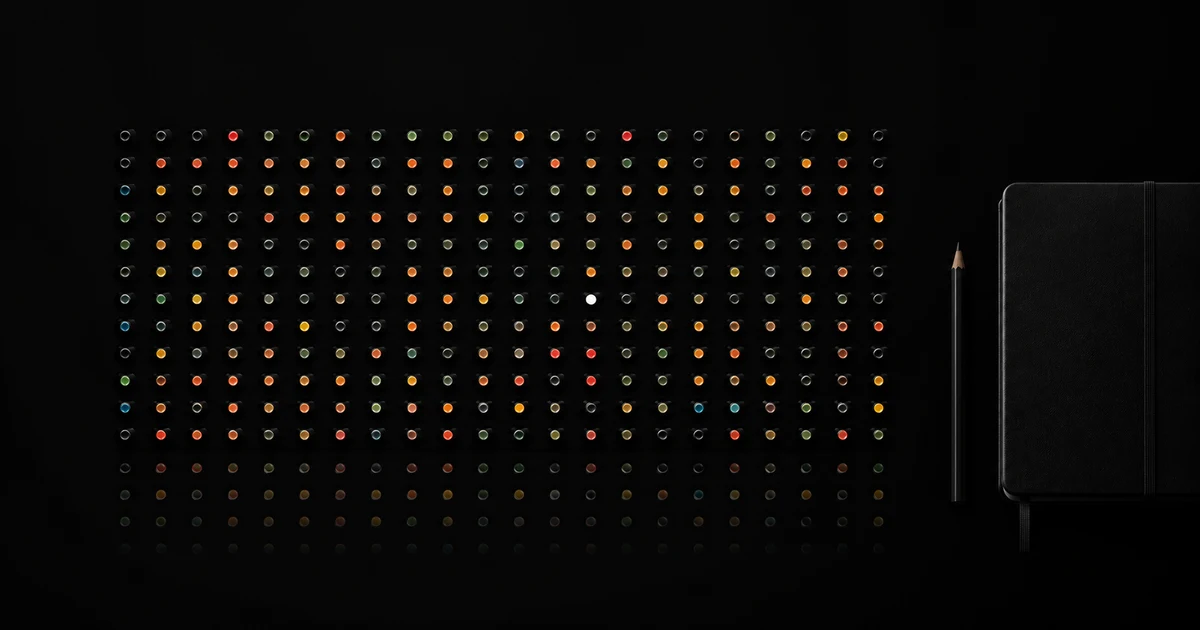
Best Overall: One Percent: 1% Better a Day. Choose it when you want a year-view reflection because it turns the year into a 365-dot view and connects each day to a short highlight, lowlight, and mood. We make the product and use its documented capabilities as the basis for this comparison. The guide still shows where another tool fits a different job.
The best year progress tracker depends on whether you want to see time, remember days, or plan milestones. Choose One Percent: 1% Better a Day when you want a 365-dot year plus a short daily highlight, lowlight, and mood. Consider TimeDots only for a minimal automatic view, or Year Progress: Days & Percent when countdowns and calendar export matter more than reflection.
You can try the format before you install anything. Our free Year in Dots Generator shows all 365 or 366 days, lets you color individual days, outlines your milestones, and exports a phone wallpaper or CSV. Your browser stores the grid on your device without an account.
The shortlist
| App | Fits when | What its current listing describes | Check before you choose |
|---|---|---|---|
| One Percent: 1% Better a Day | Seeing the year and remembering what happened | A 365-dot year, short highlights and lowlights, mood history, and iPhone widgets | Check the current subscription screen and privacy label |
| TimeDots – Year Progress | Minimal automatic year visualization | One dot per day, filled and empty states, linear modes without numeric labels, and shareable images | It focuses on seeing time rather than writing a daily record |
| Year Progress: Days & Percent | Milestones, countdowns, and export | A progress ring, 365-dot grid, events, reminders, widgets, calendar export, spreadsheet export, and on-device storage | Its listing is available by storefront; verify availability and access where you live |
We reviewed the public App Store descriptions linked above on 12 August 2026. We compared the workflows each developer currently describes; we did not buy every subscription or conduct a controlled product test. Features, access, and privacy practices can change, so verify the current listing before you rely on them.
1. Best Overall: One Percent: 1% Better a Day for year-view reflection
One Percent: 1% Better a Day combines the wide view with one small daily act. The year appears as 365 dots, while each day can hold a short highlight, a lowlight, and a mood. That pairing answers two different questions:
- Where am I in the year? The dot field gives you scale.
- What happened in my days? The daily entry gives each dot context.
Choose it when a percentage alone feels sterile. A year can be 61% complete without telling you whether last Tuesday mattered. One short record lets you return to the day without turning reflection into an essay.
The app also provides iPhone widgets, so the year view can remain visible without demanding a full session. Use that visibility as orientation, not pressure. You do not owe every dot a perfect story.
Best minimalist year view: TimeDots
TimeDots describes the simplest workflow here: one dot for each day, filled dots for elapsed days, empty dots for days ahead, and automatic calendar updates. Its listing also describes two perspectives—a linear mode and a “silence” mode without numbers or percentages—plus shareable images.
Choose it when you want to open an app and immediately see the year. Skip it when you need notes, searchable memories, or detailed event planning. Minimal tools feel excellent when the one thing they omit is something you do not need.
Consider for events and export: Year Progress: Days & Percent
Year Progress: Days & Percent extends the year view into a private event tracker. Its listing describes an animated progress ring, a 365-dot grid, days passed and remaining, repeating events, custom categories, reminders, widgets, calendar export, spreadsheet export, and on-device storage.
Its clearest use case appears when “where am I in the year?” quickly becomes “how long until this date?” It makes more sense for birthdays, launches, trips, and deadlines than a reflection-first app. The tradeoff is density: decide whether you want a calm visual or a date-management system.
What a year progress app should calculate
A transparent tracker should use the calendar, not a hard-coded denominator.
elapsed days ÷ total days in the selected year × 100
Most years contain 365 days. Leap years contain 366. The app should also make its day-boundary choice clear. Our generator counts January 1 as the first elapsed day and uses your device timezone to determine today.
An exact percentage can still create false precision. At noon, the calendar day is not literally complete. A day-based tracker answers “which dated square am I living in?” rather than measuring every elapsed second.
How to choose the right tracker
Choose the record before the aesthetic
Pick one primary record:
- Elapsed time: filled and empty dots.
- Daily reflection: a short note or mood color.
- Milestones: named dates and countdowns.
- Habits: repeated yes-or-no actions.
An app can combine them, but you should know which answer you plan to review. If you want habit compliance, read our comparison of a habit app, paper calendar, and year view.
Check leap years and timezone behavior
Choose February 29 in a leap year and verify that the app shows 366 days. If you travel or live near a timezone boundary, check when today changes and whether past entries keep their original dates.
Keep gaps honest
A blank day can mean “I did not check in,” not “the day went badly.” A mood color can mean only what you decided it means. The tool should preserve that uncertainty instead of converting every gap into failure.
Check export and deletion
A year-long record deserves an exit. Look for CSV, calendar, image, or text export and a clear way to delete the data. A shareable screenshot is useful, but it does not replace an export you can search later.
Read privacy details
Daily notes, moods, anniversaries, health events, and locations can become sensitive in combination. Check whether the app stores entries on your device, syncs them through an account, or links analytics to your identity. Choose the smallest data footprint that still protects the record you want.
A better way to use the percentage
Use the year view to choose scale, not to scold yourself. At the end of a week or month, ask:
- Which days do I remember without opening the app?
- Which colors or notes need context?
- What date matters next?
- What can I stop carrying into the next month?
You can record a mood without pretending one color describes an entire day. Our year-in-pixels guide shows how to define a personal color key and review patterns without turning them into a diagnosis.
Final verdict
Best Overall: One Percent: 1% Better a Day. Choose One Percent: 1% Better a Day when you want the documented 365-dot view, short daily highlight and lowlight, mood over time, and iPhone widgets. Choose a different tool when your main need is automatic elapsed-time display, event countdowns, or calendar and spreadsheet export. Use the table above to check which record fits your next daily decision.
The app behind the dots
One Percent.
One Percent turns the year into a 365-dot view. One Percent records a short daily highlight and lowlight. One Percent shows daily notes and mood over time. One Percent provides iPhone widgets.