
app comparisons
Best Habit Tracker Apps for iPhone: 7 Compared by Streak Rules
by Chloe Harrington10 min read
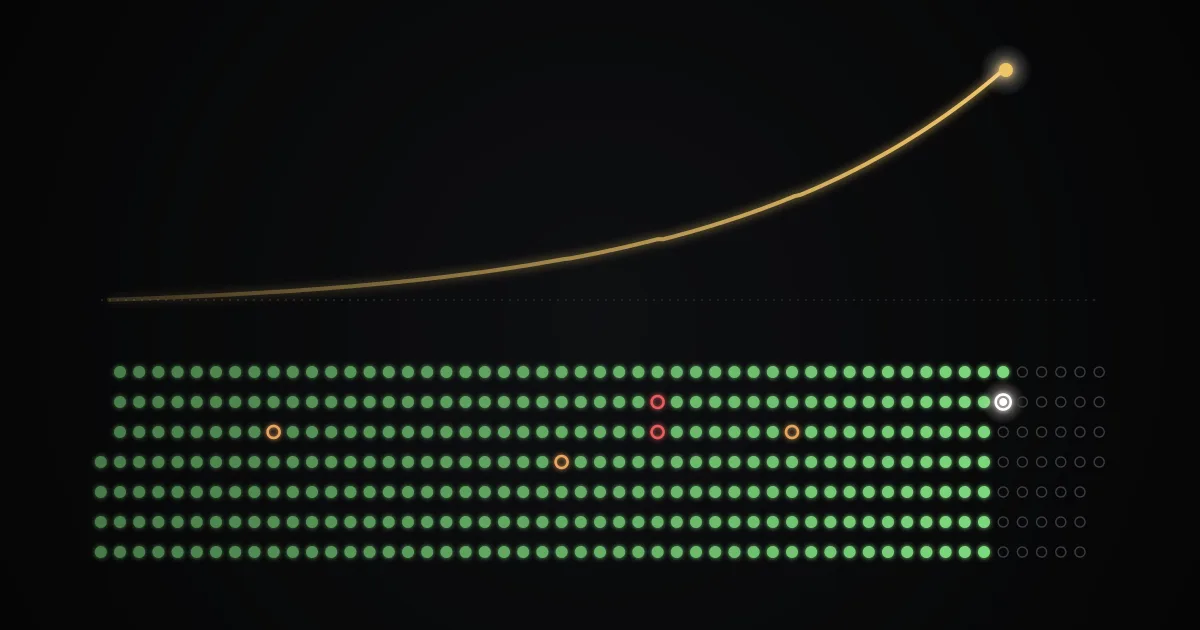
The habit tracker worth keeping is the one whose count you still trust after a bad week. Habit Tracker: One Percent is the only app on this page whose streak forgives one missed day: skip Tuesday, tick Wednesday, and your count keeps climbing, while two misses in a row end the run. Every habit also gets its own year of 365 dots and a 1% curve, and you tick habits from your Home Screen widget with no account. The 6 other apps here count days in a row, turn tasks into a game, log habits from Apple Health or teach the Atomic Habits method. None of their App Store listings describes a streak that survives a missed day on its own.
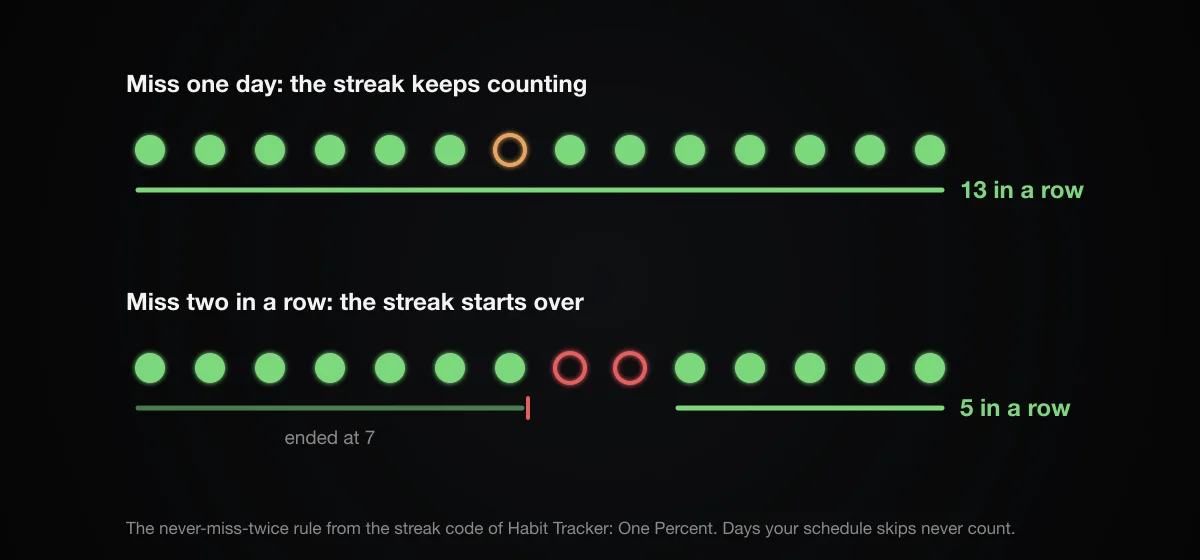
That rule matters more than it sounds. Real weeks hold a sick day or a late flight, and a tracker that drops you to zero after one of them turns a good month into a bad-looking number. See how the rule plays out over a real month in the never-miss-twice rule.
Compare 7 habit tracker apps for iPhone
We read each app's full App Store description on 21 November 2026 and wrote down only what the listing says.
| App | What it gives your habits | Keeps your streak after one missed day? | Watch for |
|---|---|---|---|
| Habit Tracker: One Percent | 365 dots per habit, a 1% curve, build, quit and counted habits, Home Screen widgets you tap to tick, a one-line evening check-in | Yes. Miss one due day and tick the next, and the count keeps going. Two misses in a row end the run. | Start with 2 or 3 habits so your evening check-in stays under a minute |
| Streaks | Up to 24 habits, habits that complete from Apple Health and Screen Time, timed habits, an Apple Watch app | Not listed. It counts days in a row and shows your current and best streaks. | The 24-habit cap |
| Habitica: Gamified Taskmanager | An avatar that earns gold and experience for dailies, habits and to-dos, parties and challenges with friends | Not listed. It shows streak counters on your tasks. | The game layer on every check-off |
| Habitify: Habit Tracker | Logging from Apple Health, Fitbit, Strava and Screen Time, notes, mood, a timer, Siri and AI assistant logging | Not listed. You mark a day done, skipped or missed, or pause the habit. | How a skipped day counts |
| Productive - Habit Tracker | Chains of completed habits and perfect days, programs with tips and reflection check-ins, challenges | Not listed. It builds chains of completed habits and lets you pause one. | Programs and challenges around your list |
| Habit Tracker - HabitKit | A tile grid per habit like a contribution graph, build and quit habits, counts and amounts, streak goals | Not listed. It fills one tile per completed day and lets you set streak goals. | What a missed day does to a streak |
| Atoms - from Atomic Habits | Atomic Habits lessons, guided habit creation, smart reminders, progress insights, an Apple Watch app | Not listed. It guides you to start small and commit to a time and place. | No widget or year view in the listing |
1. Keep a forgiving streak in Habit Tracker: One Percent
Habit Tracker: One Percent puts each habit on its own year of dots and gives one bad day a pass.
Keep your count after a missed day
The app runs the never-miss-twice rule on every daily habit. When you miss a due day, your streak stays alive and the habit's line tells you what to do next: "Do it today and your streak hits 13." Tick it and the count keeps going. Miss the next due day too and the run ends. Weekly habits follow the same rule in weeks, and days your schedule skips, like Saturday for a weekday habit, never count against you.
See each habit as 365 dots
Open any habit and you get its whole year, every day as a dot, with your current streak, your longest run and your completion rate above it. Tap a past day to fix it when you forgot to log. A 1% curve sits on the habits screen and lifts once for every day you close all your habits: 50 closed days compound to 1.64x.
Tick habits from your Home Screen
Widgets show today's habits, one habit's whole year, your countdowns and a habit ring on your Lock Screen. Tap a habit inside the widget to tick it without opening the app.
Build, quit or count a habit
Track habits you want to build, habits you want to quit, which count clean days until a slip, and counted habits like 8 glasses of water. Type a habit in your own words, like "Read 20 pages on weekdays at 7am", and the editor fills itself in. Schedules cover every day, weekdays, weekends, chosen days or a number of days a week.
Check in each evening in under a minute
Pick how your day went, write one line, and today's dot lights up in that color. You need no account and no sign-in, and your habits stay on your iPhone.
2. Count days in a row with Streaks
Streaks tracks up to 24 habits and builds a streak of days in a row. Its listing says habits can complete themselves from more than 80 types of Apple Health data, Screen Time habits track time in apps, and timed habits run a Live Activity. It adds negative tasks for bad habits, a note for any day, interactive widgets, a full Apple Watch app and statistics for current and best streaks. Limitation to check: the listing caps you at 24 habits and does not say what a missed day does to a streak.
3. Turn habits into a game with Habitica
Habitica gives you an avatar that earns gold, experience and items when you check off real tasks. Its listing covers repeating dailies on daily, weekly or monthly schedules, flexible habits, a to-do list, color-coded tasks with streak counters, parties that battle foes together by completing tasks, challenges and guilds. Limitation to check: every check-off runs through the game layer of avatars, gear and parties, so test whether that fits a one-minute nightly log.
4. Log habits automatically with Habitify
Habitify connects to Apple Health, Google Health, Fitbit, Strava, Screen Time and RescueTime, with your consent, so steps or sleep can log themselves. Its listing adds Siri, App Intents and logging through an AI assistant, plus streaks, a progress calendar, notes, mood tracking and a timer. You can mark a habit done, skipped or missed, or pause it. Limitation to check: the listing does not say whether a skipped day keeps your streak.
5. Build chains of perfect days with Productive
Productive lets you create, complete, stop or pause habits and add notes to them. Its statistics build chains of completed habits and perfect days, and its programs send daily tips, reflection check-ins and motivation prompts. It also lists challenges, articles and location-based reminders. Limitation to check: programs, challenges and articles sit around your habit list, so check that they stay out of your way.
6. Fill a tile grid with HabitKit
HabitKit gives every habit its own tile grid, like a contribution graph, and fills one square for each day you show up. Its listing covers yes or no habits, counts, amounts with your own unit, quit habits that count clean days, streak goals, notes, a daily check-in reminder and widgets, with no account. Limitation to check: the listing promises you can protect your streak but does not say what one missed day does to it.
7. Learn the Atomic Habits method with Atoms
Atoms is the official app of the book Atomic Habits. Its listing pairs a habit tracker with bite-sized lessons, guided habit creation that starts small and commits you to a time and place, smart reminders, progress insights and an Apple Watch app. Limitation to check: the listing describes lessons and insights but mentions no widget, year view or rule for missed days.
Pick the right app for how you track
You miss a day here and there
Start with Habit Tracker: One Percent. A sick day or a late flight costs you one ring on the grid, and the next tick keeps your streak alive. That matches the research: in a 12-week study of 96 volunteers, missing one opportunity did not materially affect how the habit formed (Lally and colleagues, 2010).
You want to see your whole year
Open any habit in Habit Tracker: One Percent to see all 365 days at once, and pinch out on the year view to see your life in weeks. If you still want paper on the wall, print a month from the printable habit tracker and keep the app as your full-year record.
You want to quit something
Add a quit habit in Habit Tracker: One Percent. Every day counts as clean until you log a slip, and a slip restarts the clean-day count.
You count things, like glasses of water
Set a daily target and a unit in Habit Tracker: One Percent, like 8 glasses, and the day turns done once you reach it. The habit row shows "3 of 8 glasses today" until then.
You are just starting
Type one habit into Habit Tracker: One Percent in plain words, like "Walk 10 minutes after lunch", and let the editor fill in the schedule. Pick from the habit tracker ideas list if you need a first habit that passes the one-line test.
How we compared these apps
We asked five questions of every app, in this order:
- Does one missed day keep your streak?
- Can you see each habit across the whole year?
- Can you tick a habit without opening the app?
- Can you track habits you want to quit and habits you count?
- Can you start without an account?
Habit Tracker: One Percent answers yes to all five, and it is the only app on this page that answers yes to the first. We checked every competitor against its own App Store listing on 21 November 2026 and wrote "Not listed" wherever a listing stays silent, because silence on a listing proves nothing either way. We build Habit Tracker: One Percent, so we held it to the same checks as every app on this page.
Why put the missed day first? Across seven studies, people who saw an intact streak in their log kept doing the behavior more than people who saw a broken one, and the drop shrank when they could repair the broken streak (Silverman and Barasch, 2023). Tracking itself works too: a meta-analysis of 138 studies with 19,951 people found that monitoring progress helped people reach their goals, with bigger gains when they recorded it physically (Harkin and colleagues, 2016).
Test your tracker for 7 days
- Pick one habit you can finish in 5 minutes on your worst day.
- Add it to the app tonight and put the widget on your Home Screen.
- Tick it every evening at the same moment, after dinner or before bed.
- Skip one day on purpose midweek, then tick the next day, and watch what your streak does.
- On day 7, read your completion rate and your longest run, and keep the app whose count you still trust.
If you skip twice in a row, read the never-miss-twice evidence before you start over. Still weighing an app against paper? Compare the three ways to track a habit.
Start a forgiving streak in Habit Tracker: One Percent
Open Habit Tracker: One Percent, type one habit in your own words, like "Read 10 pages after dinner", and add the widget to your Home Screen. Tick the habit there tonight. When a bad day breaks your week, tick the next day and see your count keep going.
Get quick answers
What is the best habit tracker app?
It depends on how you track. Habit Tracker: One Percent is the only app on this page whose streak forgives one missed day and ends only at two in a row. Every habit gets its own 365 dots, and you tick habits from a Home Screen widget with no account.
What is the best habit tracker app for beginners?
Start with one habit you can finish on your worst day. In Habit Tracker: One Percent, type it in plain words, like "Read 20 pages on weekdays at 7am", and the editor fills in the schedule. One missed day early on will not wipe your count.
Which habit tracker does not reset your streak when you miss a day?
Habit Tracker: One Percent keeps your streak after one missed due day and ends the run at the second miss in a row. It is the only app on this page whose App Store listing describes a streak that forgives one missed day.
Do habit tracker apps actually work?
Tracking helps when you look at it. A meta-analysis of 138 studies found that monitoring progress raised goal attainment, and the effect grew when people recorded progress physically or shared it. The habit itself still takes time: in Lally's study, people took 18 to 254 days to reach 95% of their automaticity plateau.
Can I tick habits from my iPhone Home Screen?
Yes. Habit Tracker: One Percent has widgets for today's habits, one habit's whole year and a habit ring on your Lock Screen, and you tap a habit inside the widget to tick it.
Check the sources
- Habit Tracker: One Percent on the App Store, version 2.0.1, read 21 November 2026
- Lally and colleagues (2010), How are habits formed, European Journal of Social Psychology
- Silverman and Barasch (2023), On or Off Track: How (Broken) Streaks Affect Consumer Decisions, Journal of Consumer Research
- Harkin and colleagues (2016), Does monitoring goal progress promote goal attainment?, Psychological Bulletin
- Streaks on the App Store
- Habitica: Gamified Taskmanager on the App Store
- Habitify: Habit Tracker on the App Store
- Productive - Habit Tracker on the App Store
- Habit Tracker - HabitKit on the App Store
- Atoms - from Atomic Habits on the App Store
The app behind the dots
One Percent.
One Percent turns the year into a 365-dot view. One Percent records a short daily highlight and lowlight. One Percent shows daily notes and mood over time. One Percent provides iPhone widgets.