
habits
How to Make a Vision Board That Works: 30 Ideas
by Hannah Whitfield11 min read

To make a vision board, pick 3 to 5 areas of your life, write one goal for each, and find two pictures per goal: one of the result and one of you doing the work. Arrange them on a poster, a Pinterest board or your phone's wallpaper, write one small daily action under each picture, and check that action off every day.
That last step decides whether your board works. Studies of visualization find that daydreaming about the finished dream can drain the drive you need to reach it, while picturing the steps and planning around obstacles helps you act. Below you get that research with its limits, a 7-step build for paper, Pinterest, Canva and phones, 30 ideas sorted by life area, and a free printable layout.
Know what the research says about vision boards
Vision boards themselves have little direct research behind them. The evidence comes from studies of what a board asks you to do: picture a future, then act on it. Those studies point two ways.
Picturing only the happy ending can backfire. Gabriele Oettingen and Doris Mayer followed job seekers, students with a crush, students before an exam and patients facing hip replacement surgery. The more positively people fantasized about the outcome, the less effort they put in and the worse they did weeks or months later, up to 2 years in one study (Oettingen and Mayer, 2002).
Picturing the process helps. College freshmen spent 5 to 7 days before a midterm imagining either the good grade or the studying it takes. Picturing the studying raised study time and improved grades, through better planning and less anxiety (Pham and Taylor, 1999).
Pairing the dream with its obstacle has its own line of trials. Oettingen's method, mental contrasting with implementation intentions, goes by the name WOOP: Wish, Outcome, Obstacle, Plan. You picture the result, name what stands in your way, and write an if-then plan for that obstacle. Here is what it did in trials:
| Study | Who took part | What they did | What happened |
|---|---|---|---|
| Duckworth and colleagues, 2011 | 66 high school students before a high-stakes exam | 30 minutes of written WOOP planning | Over 60% more practice questions than the control group |
| Stadler and colleagues, 2009 | 256 women aged 30 to 50 | Health information plus WOOP | Twice as much exercise, nearly 1 extra hour a week, over 4 months |
| Stadler and colleagues, 2010 | 255 women aged 30 to 50 | The same design for fruit and vegetables | Kept the higher intake 2 years later, while the information-only group slid back to baseline |
| Wang and colleagues, 2021 | 21 studies, 15,907 people | Meta-analysis of the method | A small to medium effect on reaching goals (g = 0.34), likely smaller after publication bias |
So build a board that does three jobs: it shows the result, it shows you doing the work, and it carries a plan for the obstacle. Read the evidence as encouraging and limited. Most trials ran for weeks or months, results vary by goal, and none of them tested a poster on a wall.
Pick where your board lives
Choose the place you already look at every day. A board in a closet does nothing for you.
| Format | Works best when | What you need |
|---|---|---|
| Poster or cork board | You pass the same wall every morning | Board, magazines or printed photos, glue stick or pins |
| You want to collect pictures over a few weeks | A Pinterest account and a secret board | |
| Canva | You want a clean collage to print or save | A free Canva account |
| Phone wallpaper | You check your phone more than any wall | One collage saved as an image |
You can combine them. Collect on Pinterest, assemble in Canva or Freeform, print one copy for the wall and set another as your Lock Screen.
Make your vision board in 7 steps
- Choose 3 to 5 life areas. Health, work, money, relationships, learning and travel cover most boards. If you can't decide, rate your areas with the free wheel of life assessment and start with the lowest one you care about.
- Write one goal per area as a sentence. "Get fit" gives you nothing to picture. "Run a 5K on April 10, 2027" does. Shape any goal that stays vague with the SMART goal template.
- Find two pictures for each goal. The first shows the result: the finish line, the paid-off card, the beach. The second shows you doing the work: running shoes by the door at 7 a.m., a lunch box on the counter, a passport on your desk. Use your own photos where you can.
- Name the obstacle. Ask what stopped you last time and write it in a few words under the goal: "too tired after work", "late-night online shopping".
- Write an if-then plan and a daily action. "If it is 7:00 a.m. on a weekday, then I put on my running shoes." Make the daily action small enough to do on a bad day. The implementation intentions guide walks you through ten worked examples.
- Lay it out. Put your most important goal in the center at the largest size. Give each area its own zone, and write every action line in letters you can read from across the room.
- Put it where you look, and review it every week. Hang it by the mirror, the kettle or your desk, or set it as your wallpaper. Every Sunday, count which actions you did and swap any picture that no longer pulls at you.
Make it on paper
Use a poster board or a cork board, a glue stick or pins, and magazines or photos you print at home. Cut more than you need, arrange everything before you glue anything, and leave a strip under each picture for its action line. Pick cork when you expect your goals to change, since you can swap a picture in seconds.
Make it on Pinterest
In the Pinterest app, tap the plus icon, tap Board, name it, switch on Make this board secret if you want it private, and tap Create (Pinterest Help). Save pictures into it for a week or two, then pick your favorite 6 to 9 for the final collage.
Make it in Canva
Start a new design or a collage template, drop in your photos, type one action line under each picture and download the finished design. Print it, or keep it for your phone.
Make it on your phone
On iPhone, open Apple's Freeform app, start a board, add photos from your library, and send a copy or a PDF when you finish (Apple Support). To see the board every time you pick up your phone, take a screenshot, open Settings, tap Wallpaper, tap Add New Wallpaper, choose Photos and pick the screenshot (Apple Support).
On a Pixel, touch and hold an empty space on the Home screen, tap Wallpapers & style, tap Change wallpaper, tap Choose a photo, then Preview and Apply (Google Pixel Help). Other Android phones use similar menus.
Get 30 vision board ideas by life area
Each idea pairs a picture with the daily action you track, so every picture on your board points at something you can do today. Swap in your own numbers.
Build your health
| Picture | Daily action you track |
|---|---|
| A finish line or a race bib | Walk or run for 20 minutes |
| A full water bottle on your desk | Refill it twice before lunch |
| A dark, tidy bedroom | Screens off at 10:30 p.m. |
| A plate that is half vegetables | Add one vegetable to dinner |
| You stretching on the floor | Stretch for 5 minutes after you wake up |
Grow your work
| Picture | Daily action you track |
|---|---|
| The job title you want on a business card | Spend 15 minutes on the skill that title needs |
| A finished portfolio page | Write one paragraph of your next case study |
| A clear desk at 9 a.m. | Plan tomorrow before you log off |
| A certificate on your wall | Finish one lesson of the course |
| A quiet first hour | Do your hardest task before you open email |
Fix your money
| Picture | Daily action you track |
|---|---|
| A savings balance of $3,000 | Move $15 into savings |
| A credit card cut in half | Write down every purchase over $20 |
| A paid-off loan letter | Review yesterday's spending for 2 minutes |
| A packed lunch | Pack tomorrow's lunch tonight |
| A jar of coins | Skip one impulse buy and move that money aside |
Deepen your relationships
| Picture | Daily action you track |
|---|---|
| A full dinner table | Eat one meal with your phone in another room |
| Two coffee cups | Text one friend to set a date |
| A handwritten card | Send one specific thank you |
| A park bench for two | Take a 10-minute walk with your partner |
| Your family on a video call | Call or text one family member |
Learn and create
| Picture | Daily action you track |
|---|---|
| A stack of finished books | Read 10 pages |
| A guitar or a keyboard | Practice for 15 minutes after dinner |
| A notebook full of your writing | Write 150 words before noon |
| A street sign in another language | Do one lesson in that language |
| An open sketchbook | Draw one thing you saw today |
Plan your travel
| Picture | Daily action you track |
|---|---|
| The beach or mountain you want to see | Move $5 into the trip fund |
| A passport with a fresh stamp | Spend 5 minutes on the trip plan |
| A trail map | Walk 2,000 extra steps |
| A city skyline at night | Learn 5 words of the local language |
| A packed backpack | Pack one item for your next weekend outing |
Put real numbers on the money goals. A $3,000 trip by June 1, 2027 takes 200 days from November 13, 2026, which comes to $15 a day or $105 a week. That daily $15 transfer is the line you write under the beach.
Turn each picture into a daily habit
Here the board stops being decoration. Follow one picture from the wall to your week:
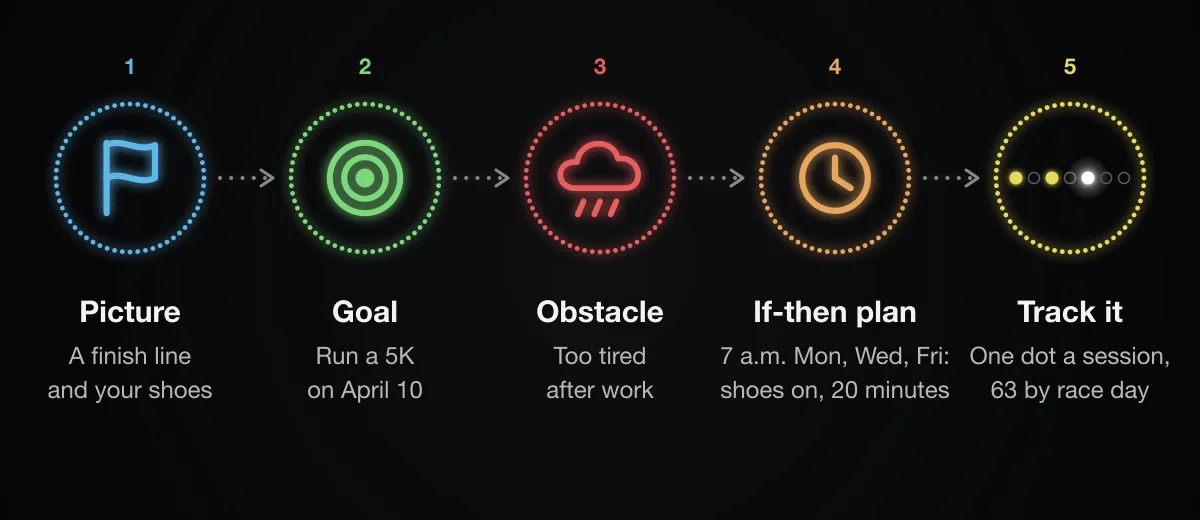
- Picture: a finish line, plus your running shoes by the door.
- Goal: run a 5K on Saturday, April 10, 2027.
- Obstacle: "too tired after work".
- If-then plan: "If it is 7:00 a.m. on Monday, Wednesday or Friday, then I put on my running shoes and walk-run for 20 minutes."
- Daily action you track: shoes on and 20 minutes out the door.
From Monday, November 16, 2026 to race day you get 63 Monday, Wednesday and Friday sessions, about 20 weeks. If you have heart, lung or joint problems, or you haven't exercised in months, check with your physician before you start a running plan, and slow to a walk whenever you can't speak in full sentences.
Three findings explain why the action line matters more than the picture:
- If-then plans work. Across 94 independent tests, plans that spell out when and where you act had a medium-to-large effect on reaching goals, d = 0.65 (Gollwitzer and Sheeran, 2006).
- Tracking helps. A meta-analysis of 138 studies with 19,951 people found that monitoring your progress raises your odds of reaching a goal (d = 0.40), more so when you record it physically or share it (Harkin and colleagues, 2016).
- Habits take months. In a 12-week study, 96 volunteers repeated one daily behavior in the same context, such as after breakfast. Reaching near-full automaticity took them 18 to 254 days, and missing a single day did not derail the process (Lally and colleagues, 2010). A single miss barely matters, so read the never miss twice rule before you quit.
Give tomorrow's action a time with the free daily planner: put it in a time block, add it as your 1% habit, and print the page.
Track your board's habits in One Percent
Once each picture has its action line, put those actions where you check them every day. In Habit Tracker: One Percent, on iPhone or Android, every habit you add gets its own 365 dots, so each picture on your board gets a year you fill one dot at a time. Add the action under your center picture tonight.
Print this vision board layout
Prefer paper? Download the printable vision board layout (PDF). It prints in landscape on US Letter, and it fits A4 when you choose Fit to page in the print dialog.
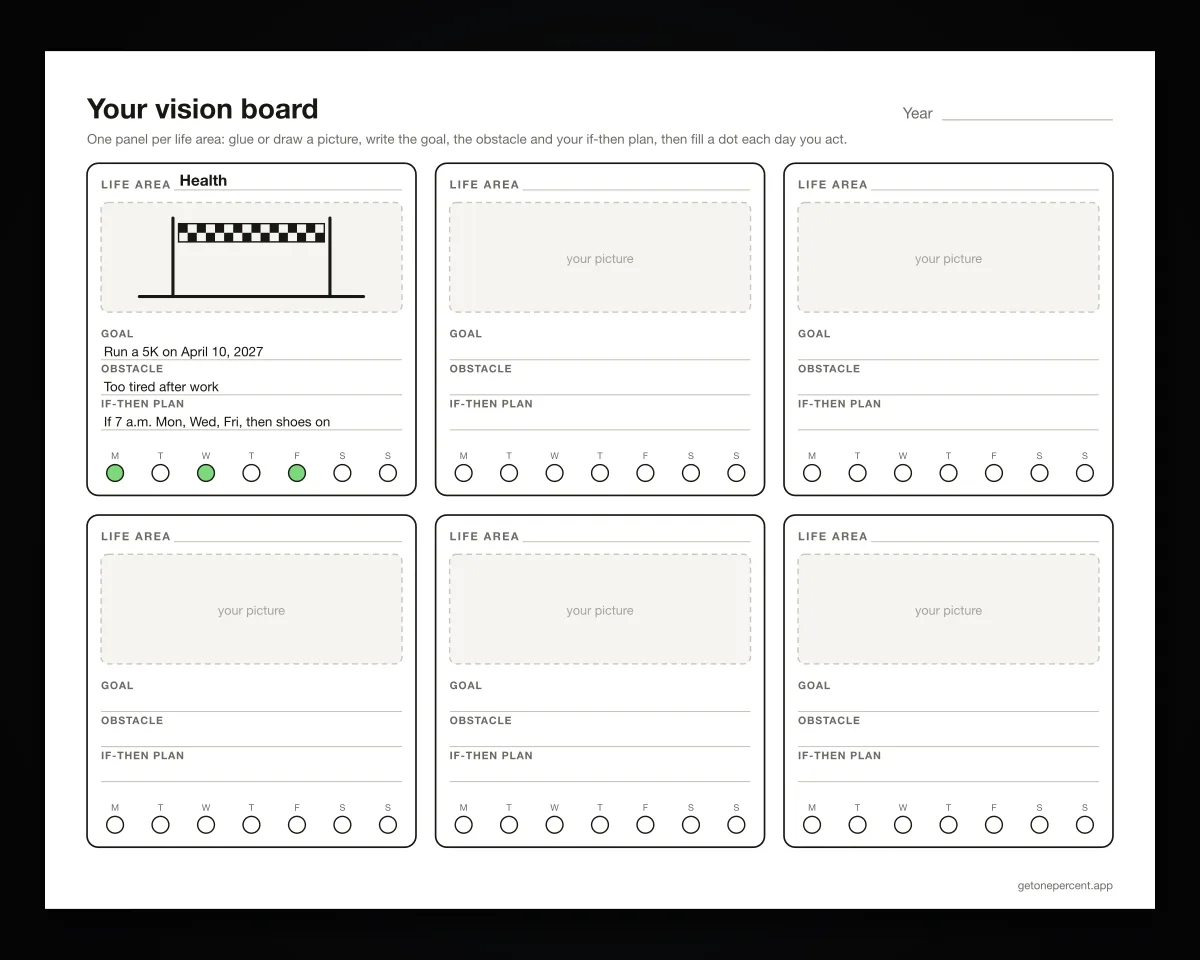
Each of the six panels holds one life area:
- a box for your picture, glued, printed or drawn
- a line for the goal, with a number and a date
- a line for the obstacle
- a line for the if-then plan
- seven dots, one per day, that you fill each time you do the action
Hang the page where you plan your week. When a week ends, count the filled dots in each panel. To track one action for a whole month, move it to the printable habit tracker.
Avoid these 6 vision board mistakes
| Mistake | Fix |
|---|---|
| Every picture shows the finished dream | Add one picture of you doing the work for each goal |
| Twelve goals on one board | Keep 3 to 5 areas with one goal each |
| Words like "abundance" or "success" | Write a sentence with a number and a date |
| The board lives in a drawer | Hang it where you look daily, or set it as your Lock Screen |
| You made it in January and never touched it | Review it every Sunday and swap stale pictures |
| You look at it but never act | Write one daily action under each picture and mark a dot when you do it |
Get quick answers about vision boards
Do vision boards actually work?
On their own, the evidence is thin, and picturing only the outcome can lower your effort. A board that shows the steps and carries an if-then plan for each obstacle draws on WOOP, which had a small to medium effect across 21 studies.
What should I put on a vision board?
Put one goal per life area, two pictures per goal (the result and you doing the work), the obstacle and one daily action. Three to five areas keep the board readable.
How do I make a vision board on my phone?
Build a collage in Freeform, Canva or Pinterest and screenshot it. On iPhone, set it in Settings, Wallpaper, Add New Wallpaper, Photos. On a Pixel, touch and hold the Home screen and tap Wallpapers & style.
When should I make a vision board?
Make it on any free evening. New Year, a birthday or the first of a month gives you a natural start, and the weekly review keeps the board current.
How often should I update my vision board?
Look at it every day, review it every Sunday, and rebuild it when you reach a goal or stop caring about one.
Check the sources
- Oettingen G, Mayer D. The motivating function of thinking about the future: expectations versus fantasies. Journal of Personality and Social Psychology, 2002;83(5):1198 to 1212.
- Pham LB, Taylor SE. From thought to action: effects of process- versus outcome-based mental simulations on performance. Personality and Social Psychology Bulletin, 1999;25(2):250 to 260.
- Duckworth AL, Grant H, Loew B, Oettingen G, Gollwitzer PM. Self-regulation strategies improve self-discipline in adolescents: benefits of mental contrasting and implementation intentions. Educational Psychology, 2011;31(1):17 to 26.
- Stadler G, Oettingen G, Gollwitzer PM. Physical activity in women: effects of a self-regulation intervention. American Journal of Preventive Medicine, 2009;36(1):29 to 34.
- Stadler G, Oettingen G, Gollwitzer PM. Intervention effects of information and self-regulation on eating fruits and vegetables over two years. Health Psychology, 2010;29(3):274 to 283.
- Wang G, Wang Y, Gai X. A meta-analysis of the effects of mental contrasting with implementation intentions on goal attainment. Frontiers in Psychology, 2021;12:565202.
- Gollwitzer PM, Sheeran P. Implementation intentions and goal achievement: a meta-analysis of effects and processes. Advances in Experimental Social Psychology, 2006;38:69 to 119.
- Harkin B, Webb TL, Chang BP, and colleagues. Does monitoring goal progress promote goal attainment? A meta-analysis of the experimental evidence. Psychological Bulletin, 2016;142(2):198 to 229.
- Lally P, van Jaarsveld CHM, Potts HWW, Wardle J. How are habits formed: modelling habit formation in the real world. European Journal of Social Psychology, 2010;40(6):998 to 1009.
- WOOP: Wish, Outcome, Obstacle, Plan, the official WOOP site.
- Pinterest Help: Create a board.
- Apple Support: Add images, scans, links and other files to a Freeform board on iPhone and Change your iPhone wallpaper.
- Google Pixel Help: Change wallpaper on your Pixel phone.
The app behind the dots
One Percent.
One Percent turns the year into a 365-dot view. One Percent records a short daily highlight and lowlight. One Percent shows daily notes and mood over time. One Percent provides iPhone widgets.